> For the complete documentation index, see [llms.txt](https://docs.yottalabs.ai/llms.txt). Markdown versions of documentation pages are available by appending `.md` to page URLs; this page is available as [Markdown](https://docs.yottalabs.ai/tutorials/training-and-fine-tuning/grpo-on-mathvista-with-unsloth.md).
# GRPO on MathVista with Unsloth
> :sloth:This tutorial is created based on [Unsloth official notebooks](https://unsloth.ai/docs/get-started/unsloth-notebooks).
**Model:** Qwen3-VL-8B-Instruct (4-bit QLoRA)\
**Algorithm:** Group Relative Policy Optimization\
**Task:** Teaching a VLM to solve math problems from images
### What Are We Solving?
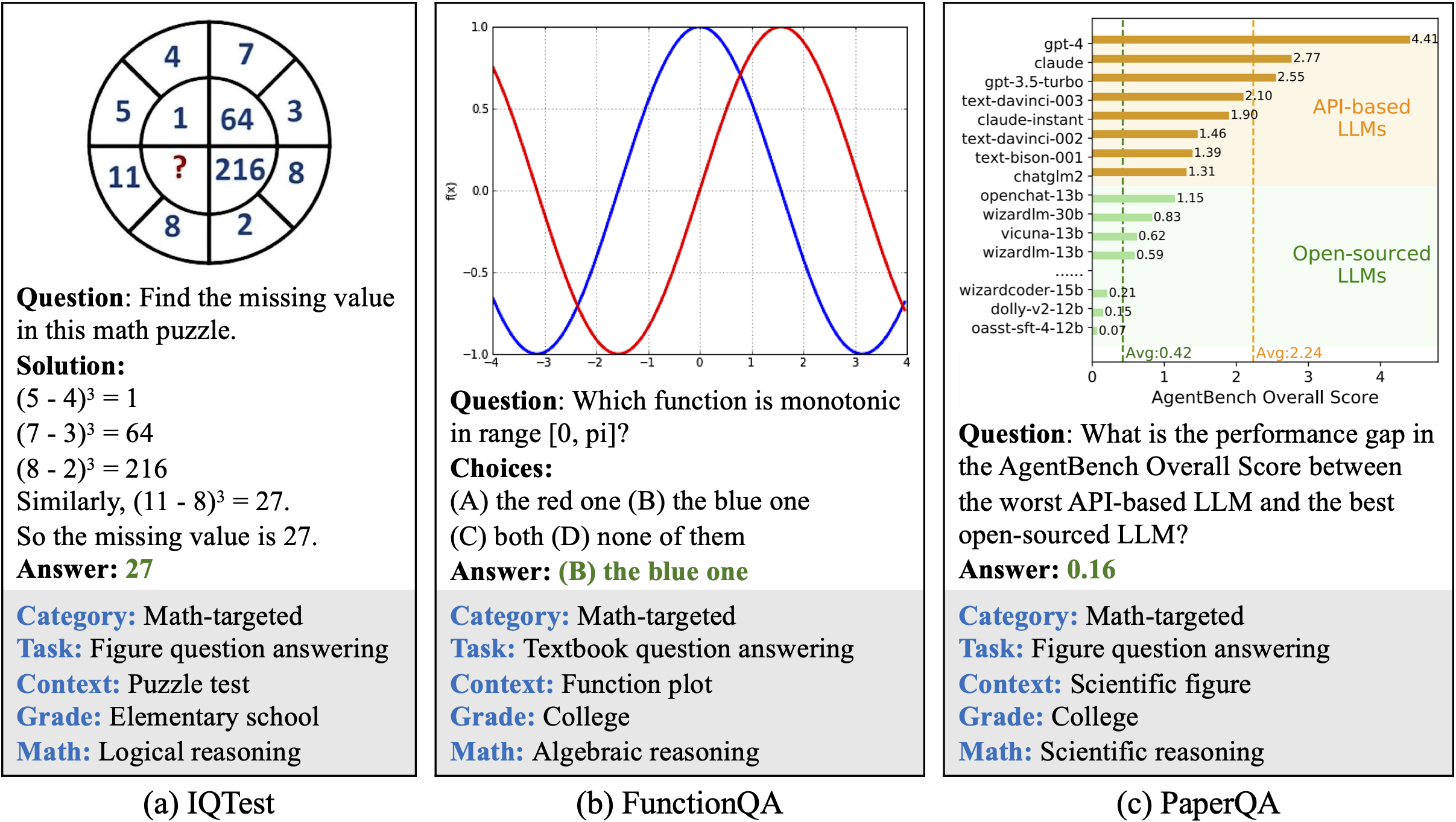
We train the model to answer visual math questions like these:
The model must look at an image, reason about it, and output a numeric answer in a structured format.
***
### Why GRPO on a VLM?
Standard supervised fine-tuning (SFT) requires ground-truth reasoning traces. GRPO instead uses **reward signals** — we only need the final answer label, and the model learns *how* to reason on its own. This is the same technique used to build o1-style thinking models.
| Method | Needs reasoning traces? | Sample efficiency |
| -------- | ----------------------- | ----------------- |
| SFT | ✅ Yes | Moderate |
| **GRPO** | ❌ No | High |
***
## Section 1 — YottaLabs Platform
Before running any code in this notebook, you need to spin up a vitrual machine on YottaLabs.
{% stepper %}
{% step %}
#### Recommended GPU Configuration
GPU
VRAM
Speed vs A100
Recommended?
Note
H100 80GB
80 GB
2×
⭐ Best
Plenty of headroom, fastest training
{% hint style="info" %}
**TL;DR:** Use **1× H100 80GB**. With 4-bit QLoRA the model uses \~25 GB, giving you lots of room.
{% endhint %}
{% endstep %}
{% step %}
#### Launch the VM
To get started with our VM , see our [official doc](https://docs.yottalabs.ai/products/virtual-machines/launching-a-virtual-machine)
{% endstep %}
{% endstepper %}
***
## Section 2 — Environment Setup
{% hint style="info" %}
✅ **Run all remaining cells inside your YottaLabs Pod** (via Jupyter at `http://:8888`).
{% endhint %}
The YottaLabs base image already has **PyTorch 2.8 + CUDA 12.8** pre-installed. We only need to add the Unsloth fine-tuning stack on top.
```python
# Install Unsloth and the full training stack
# This takes ~2-3 minutes on first run
%%capture
import os, re
!pip install unsloth
!pip install transformers==4.57.0
!pip install --no-deps trl==0.26.2
print("\n✅ All dependencies installed successfully!")
```
```python
# Verify GPU is available and check VRAM
import torch
assert torch.cuda.is_available(), "❌ No GPU detected — check your Pod configuration!"
gpu_name = torch.cuda.get_device_name(0)
vram_gb = torch.cuda.get_device_properties(0).total_memory / 1e9
vram_free = torch.cuda.mem_get_info()[0] / 1e9
print(f"✅ GPU: {gpu_name}")
print(f" Total VRAM: {vram_gb:.1f} GB")
print(f" Free VRAM: {vram_free:.1f} GB")
if vram_gb < 40:
print("⚠️ WARNING: < 40 GB VRAM detected. Reduce num_generations to 2 and keep load_in_4bit=True.")
else:
print(" This GPU has plenty of headroom for Qwen3-VL 8B GRPO training! 🚀")
```
***
## Section 3 — Load Qwen3-VL 8B with QLoRA
We load **Qwen3-VL-8B-Instruct** in **4-bit quantization** (QLoRA). This reduces the model's memory footprint from \~16 GB (BF16) to \~5 GB, while preserving most of the model's capability.
### Key Parameters Explained
| Parameter | Value | Why |
| ------------------------ | ----- | ----------------------------------------------------------------- |
| `max_seq_length` | 16384 | VLMs need long context for image tokens (\~1000 tokens per image) |
| `load_in_4bit` | True | QLoRA — reduces VRAM from \~16 GB to \~5 GB |
| `gpu_memory_utilization` | 0.85 | Leave 15% buffer for GRPO rollout buffers |
| `fast_inference` | False | Disable vLLM for training (enable only for inference-only use) |
```python
from unsloth import FastVisionModel
import torch
max_seq_length = 16384 # Must be this long for VLMs
lora_rank = 16 # Larger rank = smarter, but slower
model, tokenizer = FastVisionModel.from_pretrained(
model_name = "unsloth/Qwen3-VL-8B-Instruct-unsloth-bnb-4bit",
max_seq_length = max_seq_length,
load_in_4bit = True, # False for LoRA 16bit
fast_inference = False, # Enable vLLM fast inference
gpu_memory_utilization = 0.8, # Reduce if out of memory
)
print("\n✅ Model loaded!")
print(f" Model dtype: {model.dtype}")
print(f" VRAM used: {torch.cuda.memory_allocated() / 1e9:.2f} GB")
```
### Attach LoRA Adapters
Instead of fine-tuning all 8B parameters, LoRA injects small trainable matrices into the attention and MLP layers. Only these adapter weights are updated during training — the base model stays frozen in 4-bit.
**Why freeze the vision encoder?**\
`finetune_vision_layers = False` — The vision encoder (which converts images to tokens) is already well-trained and generalises well. Training it risks overfitting on a small dataset and uses extra VRAM.
```python
model = FastVisionModel.get_peft_model(
model,
# Which components to fine-tune:
finetune_vision_layers = False, # Keep vision encoder frozen (saves VRAM, prevents overfit)
finetune_language_layers = True, # Fine-tune the LLM decoder layers ✅
finetune_attention_modules = True, # Fine-tune attention (Q, K, V, O projections) ✅
finetune_mlp_modules = True, # Fine-tune feed-forward MLP blocks ✅
# LoRA hyperparameters:
r = LORA_RANK, # Adapter rank — higher = more capacity
lora_alpha = LORA_RANK, # Scale factor; keeping alpha == r is recommended
lora_dropout = 0, # Dropout on LoRA weights (0 = disabled, works best)
bias = "none", # Don't add bias terms to adapters
# Other:
random_state = 3407,
use_rslora = False, # Rank-stabilized LoRA (try True for rank > 32)
loftq_config = None,
use_gradient_checkpointing = "unsloth", # Unsloth's memory-efficient checkpointing
)
print(f"✅ LoRA adapters attached!")
print(f" Trainable params: {trainable:,} ({100*trainable/total:.2f}% of total)")
print(f" Total params: {total:,}")
print(f" VRAM used: {torch.cuda.memory_allocated() / 1e9:.2f} GB")
```
## Section 4 — Prepare the MathVista Dataset
[MathVista](https://mathvista.github.io/) is a benchmark of math problems that require understanding visual context (charts, geometry diagrams, tables, etc.). We use the `testmini` split (\~1000 examples) as our training set.
### Data Pipeline
```
Raw MathVista
│
▼ filter: keep only numeric answers
│ (regression task — float comparison)
▼ preprocess: resize to 512×512, convert to RGB
│
▼ format: wrap in Qwen3-VL chat template
│ with and tags
▼
Train Dataset (ready for GRPOTrainer)
```
### Why 512×512?
The original images vary in size. Resizing to a fixed 512×512:
* Keeps image token count predictable (\~1000 tokens per image)
* Prevents sequence length from exceeding `max_seq_length`
* Speeds up training (smaller feature maps in the vision encoder)
{% stepper %}
{% step %}
#### Step 1 — Load the dataset
```python
from datasets import load_dataset
from trl import GRPOConfig, GRPOTrainer
dataset = load_dataset("AI4Math/MathVista", split = "testmini")
```
{% endstep %}
{% step %}
#### Step 2 — Keep only numeric answers and preprocess images
```python
# Step 1: Keep only numeric answers
# GRPO uses exact float comparison for the correctness reward.
# Text answers like "blue" or "triangle" can't be compared numerically.
def is_numeric_answer(example):
try:
float(example["answer"])
return True
except:
return False
dataset = dataset.filter(is_numeric_answer)
```
```python
# Step 2: Resize images to 512×512 and ensure RGB format
# This keeps token count consistent and avoids memory spikes on large images.
def resize_images(example):
image = example["decoded_image"]
image = image.resize((512, 512))
example["decoded_image"] = image
return example
dataset = dataset.map(resize_images)
# Then convert to RGB
def convert_to_rgb(example):
image = example["decoded_image"]
if image.mode != "RGB":
image = image.convert("RGB")
example["decoded_image"] = image
return example
dataset = dataset.map(convert_to_rgb)
print(f"✅ Images preprocessed: {len(dataset)} examples")
print(f" Image size: {dataset[0]['decoded_image'].size}")
print(f" Image mode: {dataset[0]['decoded_image'].mode}")
```
{% endstep %}
{% step %}
#### Step 3 — Build the prompt template
We use a structured output format with XML-style tags to make it easy for reward functions to parse the model's response:
```
... model's step-by-step working ...
3.14
```
This is similar to DeepSeek-R1's `` / `` format. The two-part structure lets us:
1. **Reward format compliance** — did the model produce both tags?
2. **Reward correctness** — is the number inside `` correct?
```python
# Define the delimiter variables for clarity and easy modification
REASONING_START = ""
REASONING_END = ""
SOLUTION_START = ""
SOLUTION_END = ""
def make_conversation(example):
# Define placeholder constants if they are not defined globally
# The user's text prompt
text_content = (
f"{example['question']}. Also first provide your reasoning or working out"\
f" on how you would go about solving the question between {REASONING_START} and {REASONING_END}"
f" and then your final answer between {SOLUTION_START} and (put a single float here) {SOLUTION_END}"
)
# Construct the prompt in the desired multi-modal format
prompt = [
{
"role": "user",
"content": [
{"type": "image"}, # Placeholder for the image
{"type": "text", "text": text_content}, # The text part of the prompt
],
},
]
# The actual image data is kept separate for the processor
return {"prompt": prompt, "image": example["decoded_image"], "answer": example["answer"]}
train_dataset = dataset.map(make_conversation)
# We're reformatting dataset like this because decoded_images are the actual images
# The "image": example["decoded_image"] does not properly format the dataset correctly
# 1. Remove the original 'image' column
train_dataset = train_dataset.remove_columns("image")
# 2. Rename 'decoded_image' to 'image'
train_dataset = train_dataset.rename_column("decoded_image", "image")
```
{% endstep %}
{% endstepper %}
***
## Section 5 — Design Reward Functions
Reward functions are the heart of GRPO. Instead of manually labelling reasoning traces, we define two automatic signals that tell the model what "good" looks like:
### Reward 1 — Format Compliance (`formatting_reward_func`)
Checks whether the response contains **exactly one** `...` block and **exactly one** `...` block.
| Condition | Points |
| -------------------------------------------- | -------- |
| Has exactly 1 `` block | +1.0 |
| Has exactly 1 `` block | +1.0 |
| >50% of output is `addCriterion` / `\n` spam | −2.0 |
| **Max possible** | **+2.0** |
### Reward 2 — Correctness (`correctness_reward_func`)
Checks whether the number inside `` exactly matches the ground-truth answer.
| Condition | Points |
| --------------------------- | ------ |
| Answer matches ground truth | +2.0 |
| Answer is wrong or missing | 0.0 |
### Total Reward Range: −2.0 to +4.0
The model learns to maximise this sum across its GRPO rollouts.
{% hint style="info" %}
**What is the `addCriterion` penalty?**\
Qwen-VL models have a known degenerate mode where they repeat `addCriterion` and newlines endlessly instead of generating meaningful text. The penalty shuts this down early.
{% endhint %}
```python
# Reward functions
import re
def formatting_reward_func(completions,**kwargs):
import re
thinking_pattern = f'{REASONING_START}(.*?){REASONING_END}'
answer_pattern = f'{SOLUTION_START}(.*?){SOLUTION_END}'
scores = []
for completion in completions:
if isinstance(completion, list):
completion = completion[0]["content"] if completion else ""
score = 0
thinking_matches = re.findall(thinking_pattern, completion, re.DOTALL)
answer_matches = re.findall(answer_pattern, completion, re.DOTALL)
if len(thinking_matches) == 1:
score += 1.0
if len(answer_matches) == 1:
score += 1.0
# Fix up addCriterion issues
# See https://unsloth.ai/docs/new/vision-reinforcement-learning-vlm-rl#qwen-2.5-vl-vision-rl-issues-and-quirks
# Penalize on excessive addCriterion and newlines
if len(completion) != 0:
removal = completion.replace("addCriterion", "").replace("\n", "")
if (len(completion)-len(removal))/len(completion) >= 0.5:
score -= 2.0
scores.append(score)
return scores
def correctness_reward_func(prompts, completions, answer, **kwargs) -> list[float]:
answer_pattern = f'{SOLUTION_START}(.*?){SOLUTION_END}'
completions = [(c[0]["content"] if c else "") if isinstance(c, list) else c for c in completions]
responses = [re.findall(answer_pattern, completion, re.DOTALL) for completion in completions]
q = prompts[0]
print('-'*20, f"Question:\n{q}", f"\nAnswer:\n{answer[0]}", f"\nResponse:{completions[0]}")
return [
2.0 if len(r)==1 and a == r[0].replace('\n','') else 0.0
for r, a in zip(responses, answer)
]
print(f" Good response score: {formatting_reward_func([test_good])} (expected [2.0])")
print(f" Missing tags score: {formatting_reward_func([test_bad])} (expected [0.0])")
print(f" Spam response score: {formatting_reward_func([test_spam])} (expected [-2.0])")
```
***
## Section 6 — Pre-Training Baseline Inference
Before training, let's run the model on a sample problem to establish a **baseline**. This shows us what the model can already do, and gives us a qualitative benchmark to compare against after training.
```python
image = train_dataset[100]["image"]
prompt = train_dataset[100]["prompt"]
inputs = tokenizer(
image,
prompt,
add_special_tokens = False,
return_tensors = "pt",
).to("cuda")
from transformers import TextStreamer
text_streamer = TextStreamer(tokenizer, skip_prompt = True)
_ = model.generate(**inputs, streamer = text_streamer, max_new_tokens = 1024,
use_cache = True, temperature = 1.0, min_p = 0.1)
```
{% hint style="info" %}
Use `%pip install "jinja2>=3.1.0"` if there are any compatible errors.
{% endhint %}
***
## Section 7 — Configure & Launch GRPO Training
### How GRPO Works (Briefly)
For each training step, GRPO:
1. **Samples** `num_generations` completions from the current policy (the model)
2. **Scores** each completion with the reward functions
3. **Updates** the policy to increase the probability of high-reward completions relative to the group mean
This is fundamentally different from PPO (which needs a separate value network) — GRPO only needs the policy model, making it much more memory-efficient.
### GSPO Extension (Enabled Here)
We also enable **GSPO (Group Sequence Policy Optimisation)** via:
* `importance_sampling_level = "sequence"` — importance weights at sequence level
* `loss_type = "dr_grpo"` — doubly robust GRPO loss
This improves training stability, especially for long completions typical of VLMs.
### Key Hyperparameters
| Parameter | Value | Effect |
| ----------------------------- | ----------- | -------------------------------------------------------- |
| `learning_rate` | 5e-6 | Small LR — RL is sensitive to overshooting |
| `num_generations` | 4 | More rollouts = better gradient estimate (H100 has room) |
| `per_device_train_batch_size` | 1 | VLMs are memory-heavy; batch=1 is standard |
| `gradient_accumulation_steps` | 4 | Effective batch of 4 without extra VRAM |
| `max_grad_norm` | 0.1 | Gradient clipping — critical for RL stability |
| `optim` | adamw\_8bit | 8-bit Adam: same quality, half the optimizer state VRAM |
| `num_train_epochs` | 1.0 | Full pass over the dataset (\~600 steps) |
```python
from trl import GRPOConfig, GRPOTrainer
training_args = GRPOConfig(
learning_rate = 5e-6,
adam_beta1 = 0.9,
adam_beta2 = 0.99,
weight_decay = 0.1,
warmup_ratio = 0.1,
lr_scheduler_type = "cosine",
optim = "adamw_8bit",
logging_steps = 1,
log_completions = False,
per_device_train_batch_size = 1,
gradient_accumulation_steps = 1, # Increase to 4 for smoother training
num_generations = 2, # Decrease if out of memory
max_prompt_length = 1024,
max_completion_length = 1024,
num_train_epochs = 0.5, # Set to 1 for a full training run
# max_steps = 60,
save_steps = 60,
max_grad_norm = 0.1,
report_to = "none", # Can use Weights & Biases
output_dir = "outputs",
# Below enables GSPO:
importance_sampling_level = "sequence",
mask_truncated_completions = False,
loss_type = "dr_grpo",
)
print("✅ Training configuration set!")
print(f" Output dir: {OUTPUT_DIR}")
print(f" Epochs: {training_args.num_train_epochs}")
print(f" Num generations: {training_args.num_generations}")
print(f" Effective batch: {training_args.per_device_train_batch_size * training_args.gradient_accumulation_steps}")
print(f" Max grad norm: {training_args.max_grad_norm}")
```
```python
trainer = GRPOTrainer(
model = model,
args = training_args,
# Pass the processor to handle multimodal inputs
processing_class = tokenizer,
reward_funcs = [
formatting_reward_func,
correctness_reward_func,
],
train_dataset = train_dataset,
)
print("✅ GRPOTrainer initialised. Starting training ...")
print(" (You will see reward values logged each step)")
print(" Watch for 'rewards/formatting' and 'rewards/correctness' to increase over time.\n")
trainer.train()
print("\n🎉 Training complete!")
```
***
## Section 8 — Post-Training Inference
Now let's run the same inference test as Section 6, but with the trained model. You should see:
1. **Structured output** — the model reliably uses `` and `` tags
2. **Better accuracy** — the numeric answer inside `` should be closer to correct
3. **Coherent reasoning** — the `` block should show sensible working-out steps
```python
image = train_dataset[165]["image"]
prompt = train_dataset[165]["prompt"]
inputs = tokenizer(
image,
prompt,
add_special_tokens = False,
return_tensors = "pt",
).to("cuda")
from transformers import TextStreamer
text_streamer = TextStreamer(tokenizer, skip_prompt = True)
_ = model.generate(**inputs, streamer = text_streamer, max_new_tokens = 1024,
use_cache = True, temperature = 1.0, min_p = 0.1)
```
***
## Section 9 — Save & Export
There are several ways to save the trained model depending on your use case:
| Method | File size | Use case |
| ---------------------- | --------- | ----------------------------------------- |
| **LoRA adapters only** | \~100 MB | Fine-tune further, share on HuggingFace |
| **Merged 16-bit** | \~16 GB | Deploy with vLLM or standard transformers |
| **Merged 4-bit** | \~5 GB | Memory-constrained deployment |
| **GGUF q4\_k\_m** | \~5 GB | llama.cpp / Ollama local inference |
| **GGUF f16** | \~16 GB | llama.cpp high-quality inference |
```python
import os
LORA_SAVE_DIR = "/workspace/grpo_lora"
os.makedirs(LORA_SAVE_DIR, exist_ok=True)
# ── Option 1: Save LoRA adapters only (recommended — smallest, most flexible) ─
print("Saving LoRA adapters ...")
model.save_pretrained(LORA_SAVE_DIR)
tokenizer.save_pretrained(LORA_SAVE_DIR)
print(f"✅ LoRA adapters saved to: {LORA_SAVE_DIR}")
# List saved files
import subprocess
result = subprocess.run(f"ls -lh {LORA_SAVE_DIR}", shell=True, capture_output=True, text=True)
print(result.stdout)
```
```python
# ── Option 2: Push LoRA adapters to HuggingFace Hub ─────────────────────────
# Uncomment and fill in your username/token to publish the model
# import os
# HF_TOKEN = os.environ.get("HF_TOKEN", "YOUR_TOKEN_HERE")
# model.push_to_hub("your_username/qwen3vl-8b-mathvista-grpo", token=HF_TOKEN)
# tokenizer.push_to_hub("your_username/qwen3vl-8b-mathvista-grpo", token=HF_TOKEN)
# print("✅ Model pushed to HuggingFace Hub!")
# ── Option 3: Merge to full 16-bit and save locally ───────────────────────────
# WARNING: This requires ~16 GB disk space. Uncomment to use.
# model.save_pretrained_merged("/workspace/model_merged_16bit", tokenizer, save_method="merged_16bit")
# print("✅ Merged 16-bit model saved!")
# ── Option 4: Export to GGUF (for llama.cpp / Ollama) ───────────────────────
# model.save_pretrained_gguf("/workspace/model_gguf", tokenizer, quantization_method="q4_k_m")
# print("✅ GGUF model saved!")
print("Uncomment the block you need above and re-run this cell.")
```
***
---
# Agent Instructions
This documentation is published with GitBook. GitBook is the documentation platform designed so that both humans and AI agents can read, navigate, and reason over technical content effectively. Learn more at gitbook.com.
## Querying This Documentation
If you need additional information that is not directly available in this page, you can query the documentation by asking a question.
Perform an HTTP GET request on the following URL with the `ask` and `goal` query parameters:
```
GET https://docs.yottalabs.ai/tutorials/training-and-fine-tuning/grpo-on-mathvista-with-unsloth.md?ask=&goal=
```
`ask` is the immediate question: it should be specific, self-contained, and written in natural language.
`goal` is what the user is ultimately trying to achieve, the reason they need the answer. Sharing it helps GitBook give you a better, more relevant answer. A goal is most helpful when it describes the outcome the user wants rather than restating the question. For example, with `ask=how do I create an API token`, a goal like `automate deployments from our CI pipeline` lets GitBook tailor the answer to that use case.
The response will contain a direct answer to the question and relevant excerpts and sources from the documentation.
Use this mechanism when the answer is not explicitly present in the current page, you need clarification or additional context, or you want to retrieve related documentation sections.