> For the complete documentation index, see [llms.txt](https://docs.yottalabs.ai/llms.txt). Markdown versions of documentation pages are available by appending `.md` to page URLs; this page is available as [Markdown](https://docs.yottalabs.ai/tutorials/ai-agents/nemoclaw-with-local-inference.md).
# NemoClaw with Local Inference
**Hardware:** NVIDIA RTX 6000 Ada (48 GB VRAM)
**Model:** Qwen3.5-35B-A3B (MoE, Q6\_K quantization, \~138 tok/s)
**Stack:** llama.cpp → OpenShell inference routing → OpenClaw agent
**Tested:** March23 2026, NemoClaw 2026.3.11, OpenShell 0.0.13
***
### How It Works
Before diving in, it helps to understand the data flow. The OpenClaw sandbox is an isolated Kubernetes pod — it cannot reach the host directly. All outbound traffic is routed through an OpenShell proxy at `10.200.0.1:3128`, which intercepts `https://inference.local` and forwards it to whatever backend you have configured.
```
OpenClaw agent
↓
https://inference.local
↓ (intercepted by OpenShell proxy at 10.200.0.1:3128)
OpenShell gateway (privacy router — injects credentials, rewrites model)
↓
llama-server on host (your GPU, your model)
↓
Qwen3.5-35B-A3B (MoE, 3B active params per token)
```
Two things matter here that are easy to get wrong:
1. **Do not bypass the proxy.** `inference.local` only resolves through the OpenShell proxy. Using `--noproxy` or pointing OpenClaw directly at a host IP will time out.
2. **Use `https://`, not `http://`.** The proxy only intercepts HTTPS traffic on `inference.local`.
***
### Prerequisites
| REQUIREMENT | NOTES |
| -------------- | --------------------------------------------------------------------------- |
| OS | Ubuntu 22.04 or 24.04 |
| GPU | NVIDIA RTX 6000 Ada (48 GB VRAM) |
| CUDA | 12.0+ |
| Docker | Engine 24+ with NVIDIA Container Toolkit |
| Node.js | v18+ |
| Disk | \~50 GB free |
| NVIDIA account | API key from [build.nvidia.com](https://build.nvidia.com/settings/api-keys) |
***
### Part 1 — Install NemoClaw
```bash
# Install Node.js 20
curl -fsSL https://deb.nodesource.com/setup_20.x | bash -
apt-get install -y nodejs
# Install NemoClaw CLI
npm install -g nemoclaw
```
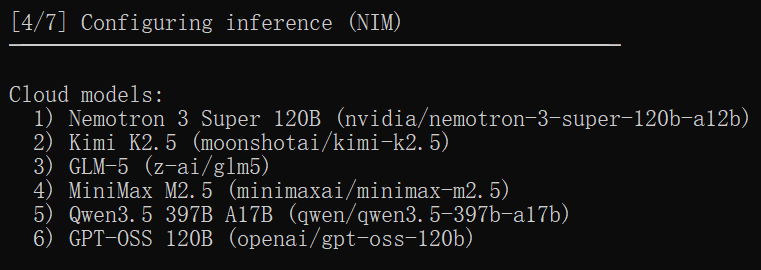
Run the onboarding wizard. It will ask for your NVIDIA API key and a cloud model — pick anything, you will replace it with the local model in Part 5.
```bash
nemoclaw onboard
```
If you hit a port conflict on 18789:
```bash
kill $(lsof -ti:18789)
nemoclaw onboard
```
At step 4, just choose a random model here as we'll use a local model by configuring manually.
Accept the suggested presets (pypi, npm) when prompted. When onboarding finishes:
```bash
openshell sandbox list
# NAME NAMESPACE PHASE
# my-assistant openshell Ready
```
***
### Part 2 — Build llama.cpp
```bash
apt-get update && apt-get install -y cmake build-essential aria2 tmux
```
```bash
git clone https://github.com/ggerganov/llama.cpp
cd llama.cpp
```
RTX 6000 Ada is Ada Lovelace — compile with `sm_89`. The `GGML_CUDA_FA_ALL_QUANTS` flag is required for Flash Attention to work with quantized KV caches.
```bash
cmake -B build \
-DGGML_CUDA=ON \
-DGGML_CUDA_FA_ALL_QUANTS=ON \
-DCMAKE_CUDA_ARCHITECTURES="89" \
-DCMAKE_BUILD_TYPE=Release
cmake --build build --config Release -j$(nproc)
```
Compilation takes 5–10 minutes. Done when you see `[100%] Built target llama-server`.
> **Architecture reference:** Blackwell (RTX 5090) → `120`, Ampere (A100/A40/RTX 3090) → `80`, Turing (RTX 2080) → `75`
***
### Part 3 — Download the Model
With 48 GB of VRAM, Q6\_K gives you near-FP16 accuracy at \~27 GB. Q4\_K\_XL is faster if you want to trade a bit of quality for throughput.
If you use a RTX 4090, use the Q4\_K\_XL to avoid OOM problems.
```bash
mkdir -p ~/llama.cpp/models
# Recommended: Q6_K (~27 GB, near-FP16 quality)
aria2c -x16 -s16 -k 1M \
"https://huggingface.co/unsloth/Qwen3.5-35B-A3B-GGUF/resolve/main/Qwen3.5-35B-A3B-UD-Q6_K_XL.gguf" \
-d ~/llama.cpp/models/ \
-o Qwen3.5-35B-A3B-UD-Q6_K_XL.gguf
# Alternative: Q4_K_XL (~19 GB, faster)
# aria2c -x16 -s16 -k 1M \
# "https://huggingface.co/unsloth/Qwen3.5-35B-A3B-GGUF/resolve/main/Qwen3.5-35B-A3B-UD-Q4_K_XL.gguf" \
# -d ~/llama.cpp/models/ \
# -o Qwen3.5-35B-A3B-UD-Q4_K_XL.gguf
```
***
### Part 4 — Start llama-server
Run this in a tmux session so it survives terminal disconnects.
```bash
tmux new -s llama
```
Inside tmux, start the server. The `--jinja` flag is critical — it enables the model's built-in Jinja chat template, which outputs OpenAI-compatible JSON tool calls. Without it, any agent request that triggers a tool call will fail with a parse error.
```bash
cd ~/llama.cpp
./build/bin/llama-server \
-m ./models/Qwen3.5-35B-A3B-UD-Q6_K_XL.gguf \
--ctx-size 32768 \
--cache-type-k q8_0 \
--cache-type-v q8_0 \
--flash-attn on \
-ngl 99 \
--host 0.0.0.0 \
--port 9090 \
--jinja
```
For Q4\_K\_XL, use this command:
```bash
cd ~/llama.cpp
./build/bin/llama-server \
-m ./models/Qwen3.5-35B-A3B-UD-Q4_K_XL.gguf \
--ctx-size 16384 \
--cache-type-k q4_0 \
--cache-type-v q4_0 \
--flash-attn on \
-ngl 99 \
--host 0.0.0.0 \
--port 9090 \
--jinja
```
{% hint style="info" %}
\--jinja is an important variable!
{% endhint %}
Detach from tmux with `Ctrl+B D`. The server keeps running in the background.
Wait for the model to load (you will see `server is listening on http://0.0.0.0:9090`), then verify:
```bash
curl http://127.0.0.1:9090/v1/models
```
You should get back JSON listing the model. If it times out, give it another 30 seconds — first load takes a moment.
***
### Part 5 — Register the Local Inference Provider
This is where OpenShell learns about your llama-server. Use the host's public IP — `127.0.0.1` does not work because requests originate from inside the gateway container.
```bash
# Get your host's public IP
ip addr show eth0 | grep "inet " | awk '{print $2}' | cut -d/ -f1
```
```bash
openshell provider create \
--name llama-local \
--type openai \
--credential OPENAI_API_KEY=none \
--config OPENAI_BASE_URL=http://:9090/v1
```
Set the inference route. Use `--no-verify` because `host.openshell.internal` resolves differently inside the gateway than from your host shell.
```bash
openshell inference set \
--provider llama-local \
--model Qwen3.5-35B-A3B-UD-Q6_K_XL.gguf \
--no-verify
```
Confirm it saved:
```bash
openshell inference get
# Provider: llama-local
# Model: Qwen3.5-35B-A3B-UD-Q6_K_XL.gguf
# Version: 3
```
***
### Part 6 — Configure OpenClaw
OpenClaw reads its config from `/sandbox/.openclaw/openclaw.json` inside the pod. The file is owned by root and read-only from inside the sandbox, so write it from the host via kubectl.
First, grab your gateway auth token:
```bash
docker exec openshell-cluster-nemoclaw kubectl exec -n openshell my-assistant -- \
python3 -c "import json; d=json.load(open('/sandbox/.openclaw/openclaw.json')); print(d['gateway']['auth']['token'])"
```
Then write the updated config — replace `YOUR_GATEWAY_TOKEN` with the value above:
```bash
docker exec openshell-cluster-nemoclaw kubectl exec -n openshell my-assistant -- python3 -c "
import json
config = {
'wizard': {'lastRunAt': '2026-03-23T09:47:00.000Z', 'lastRunVersion': '2026.3.11', 'lastRunCommand': 'doctor', 'lastRunMode': 'local'},
'models': {
'mode': 'merge',
'providers': {
'llama-local': {
'baseUrl': 'https://inference.local/v1',
'apiKey': 'unused',
'api': 'openai-completions',
'models': [{
'id': 'Qwen3.5-35B-A3B-UD-Q6_K_XL.gguf',
'name': 'Qwen3.5-35B-A3B',
'reasoning': True,
'input': ['text'],
'cost': {'input': 0, 'output': 0, 'cacheRead': 0, 'cacheWrite': 0},
'contextWindow': 32768,
'maxTokens': 4096
}]
}
}
},
'agents': {'defaults': {'model': {'primary': 'llama-local/Qwen3.5-35B-A3B-UD-Q6_K_XL.gguf'}}},
'commands': {'native': 'auto', 'nativeSkills': 'auto', 'restart': True, 'ownerDisplay': 'raw'},
'channels': {'defaults': {}},
'gateway': {
'mode': 'local',
'controlUi': {'allowedOrigins': ['http://127.0.0.1:18789'], 'allowInsecureAuth': True, 'dangerouslyDisableDeviceAuth': True},
'auth': {'token': 'YOUR_GATEWAY_TOKEN'},
'trustedProxies': ['127.0.0.1', '::1']
},
'meta': {'lastTouchedVersion': '2026.3.11', 'lastTouchedAt': '2026-03-23T09:47:00.000Z'}
}
open('/sandbox/.openclaw/openclaw.json', 'w').write(json.dumps(config, indent=2))
print('done')
"
```
Replace `Qwen3.5-35B-A3B-UD-Q6_K_XL.gguf` with `Qwen3.5-35B-A3B-UD-Q4_K_XL.gguf` if you use a RTX 4090.
Verify the write:
```bash
docker exec openshell-cluster-nemoclaw kubectl exec -n openshell my-assistant -- \
cat /sandbox/.openclaw/openclaw.json | grep baseUrl
# "baseUrl": "https://inference.local/v1"
```
***
### Part 7 — Test
Connect to the sandbox:
```bash
openshell sandbox connect my-assistant
```
Test the inference endpoint directly.
{% hint style="info" %}
Do not use `--noproxy` — the proxy needs to intercept this request.
{% endhint %}
```bash
curl https://inference.local/v1/chat/completions \
-H "Content-Type: application/json" \
-d '{"messages":[{"role":"user","content":"hello"}],"max_tokens":100}'
```
You should get a JSON response from Qwen3.5 within a few seconds. Then test the OpenClaw agent:
```bash
openclaw agent --agent main --local \
-m "hello, what model are you?" \
--session-id test
```
Expected output:
```bash
I'm running on llama-local/Qwen3.5-35B-A3B-UD-Q6_K_XL.gguf.
That's a Qwen3.5 model (35B parameters) running locally in this sandbox.
```
If this returns a proper response without a `Failed to parse input` error, the full stack is working.
***
### Performance
Measured on RTX 6000 Ada (48 GB, Ada Lovelace sm\_89):
| QUANTIZATION | MODEL SIZE | SPEED | QUALITY |
| ------------ | ---------- | --------------- | ----------------------- |
| Q4\_K\_XL | \~19 GB | \~120–140 tok/s | Good |
| Q6\_K | \~27 GB | \~120–140 tok/s | Very good (recommended) |
| Q8\_0 | \~36 GB | \~50–70 tok/s | Excellent |
Q6\_K and Q4\_K\_XL are close in speed because Qwen3.5-35B-A3B is a MoE model — only 3B parameters activate per token regardless of the 35B total. The bottleneck is memory bandwidth, not parameter count.
***
### Known Issues and Workarounds
#### Tool call parse error: `Failed to parse input at pos N: `
Qwen3.5 defaults to its own XML-style tool call format. OpenClaw expects OpenAI-compatible JSON. Fix: add `--jinja` to the llama-server startup command. This enables the model's built-in Jinja template which outputs proper JSON tool calls.
#### `inference.local` returns DNS resolution error
You used `--noproxy` with curl, or accessed `inference.local` over `http://` instead of `https://`. The OpenShell proxy only intercepts HTTPS. Drop `--noproxy` and use `https://`.
#### `openshell inference set` times out during verification
The gateway resolves `host.openshell.internal` differently than your host shell does. Use `--no-verify` to skip the probe and save the config anyway.
#### `openshell policy set` fails with "filesystem policy cannot be removed"
Known Alpha bug in OpenShell 0.0.13. Dynamic policy updates always fail with this error even when the YAML only contains `network_policies`. Workaround: edit the static policy file at `~/.nemoclaw/source/nemoclaw-blueprint/policies/openclaw-sandbox.yaml` and re-run `nemoclaw onboard`.
#### `openclaw config set inference.*` fails with "Unrecognized key"
OpenClaw 2026.3.11 does not recognize the `inference` config key. Write `openclaw.json` directly using the kubectl method in Part 6.
#### Provider base URL with `127.0.0.1` or `localhost` does not work
The provider request originates from inside the gateway container. Use the host's actual public IP.
***
### Configuration Reference
#### llama-server flags
| FLAG | VALUE | WHY |
| ----------------- | --------- | -------------------------------------------------------------- |
| `--host` | `0.0.0.0` | Must bind all interfaces, not just loopback |
| `--port` | `9090` | Any free port works |
| `-ngl` | `99` | Offload all layers to GPU |
| `--ctx-size` | `32768` | 32K context; increase with Q4 KV cache for longer contexts |
| `--cache-type-k` | `q8_0` | High-quality KV cache; use `q4_0` for very long contexts |
| `--cache-type-v` | `q8_0` | Same |
| `--flash-attn on` | — | Required for quantized KV cache |
| `--jinja` | — | **Required** — enables OpenAI-compatible JSON tool call format |
#### openclaw\.json provider block
```json
{
"models": {
"mode": "merge",
"providers": {
"llama-local": {
"baseUrl": "https://inference.local/v1",
"apiKey": "unused",
"api": "openai-completions",
"models": [{
"id": "Qwen3.5-35B-A3B-UD-Q6_K_XL.gguf",
"name": "Qwen3.5-35B-A3B",
"reasoning": true,
"input": ["text"],
"cost": { "input": 0, "output": 0, "cacheRead": 0, "cacheWrite": 0 },
"contextWindow": 32768,
"maxTokens": 4096
}]
}
}
},
"agents": {
"defaults": {
"model": {
"primary": "llama-local/Qwen3.5-35B-A3B-UD-Q6_K_XL.gguf"
}
}
}
}
```
#### cmake flags by GPU architecture
```bash
# Ada Lovelace (RTX 6000 Ada, RTX 4090)
cmake -B build -DGGML_CUDA=ON -DGGML_CUDA_FA_ALL_QUANTS=ON \
-DCMAKE_CUDA_ARCHITECTURES="89" -DCMAKE_BUILD_TYPE=Release
# Blackwell (RTX 5090)
cmake -B build -DGGML_CUDA=ON -DGGML_CUDA_FA_ALL_QUANTS=ON \
-DCMAKE_CUDA_ARCHITECTURES="120" -DCMAKE_BUILD_TYPE=Release
# Ampere (A100, A40, RTX 3090)
cmake -B build -DGGML_CUDA=ON -DGGML_CUDA_FA_ALL_QUANTS=ON \
-DCMAKE_CUDA_ARCHITECTURES="80" -DCMAKE_BUILD_TYPE=Release
```
***
### Quick Reference
```bash
# ── Host: start llama-server ──────────────────────────────────────
tmux new -s llama -d
tmux send-keys -t llama "cd ~/llama.cpp && ./build/bin/llama-server \
-m ./models/Qwen3.5-35B-A3B-UD-Q6_K_XL.gguf \
--ctx-size 32768 --cache-type-k q8_0 --cache-type-v q8_0 \
--flash-attn on -ngl 99 --host 0.0.0.0 --port 9090 --jinja" Enter
# ── Host: verify llama-server is up ───────────────────────────────
curl http://127.0.0.1:9090/v1/models
# ── Host: connect to sandbox ──────────────────────────────────────
openshell sandbox connect my-assistant
# ── Sandbox: test inference (no --noproxy) ────────────────────────
curl https://inference.local/v1/chat/completions \
-H "Content-Type: application/json" \
-d '{"messages":[{"role":"user","content":"hello"}],"max_tokens":100}'
# ── Sandbox: run agent ────────────────────────────────────────────
openclaw agent --agent main --local -m "your prompt here" --session-id test
# ── Sandbox: exit ─────────────────────────────────────────────────
exit
```
---
# Agent Instructions
This documentation is published with GitBook. GitBook is the documentation platform designed so that both humans and AI agents can read, navigate, and reason over technical content effectively. Learn more at gitbook.com.
## Querying This Documentation
If you need additional information that is not directly available in this page, you can query the documentation by asking a question.
Perform an HTTP GET request on the following URL with the `ask` and `goal` query parameters:
```
GET https://docs.yottalabs.ai/tutorials/ai-agents/nemoclaw-with-local-inference.md?ask=&goal=
```
`ask` is the immediate question: it should be specific, self-contained, and written in natural language.
`goal` is what the user is ultimately trying to achieve, the reason they need the answer. Sharing it helps GitBook give you a better, more relevant answer. A goal is most helpful when it describes the outcome the user wants rather than restating the question. For example, with `ask=how do I create an API token`, a goal like `automate deployments from our CI pipeline` lets GitBook tailor the answer to that use case.
The response will contain a direct answer to the question and relevant excerpts and sources from the documentation.
Use this mechanism when the answer is not explicitly present in the current page, you need clarification or additional context, or you want to retrieve related documentation sections.